
Guide to Digital Tickets
SMTD is excited to offer an improved digital ticket experience. If you opted to receive digital tickets for your upcoming performances, please see the instructions below on how to access and share them.
Step-by-Step Instructions
Tap the button below or visit wallet.smtd.umich.edu on your smartphone or tablet. We recommend starting in a new browser window in Safari or Chrome.
Log in with the email address and password you use to purchase SMTD tickets.
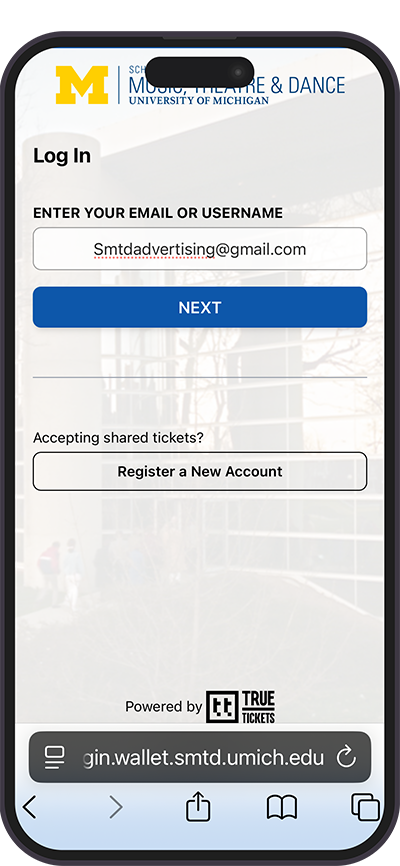
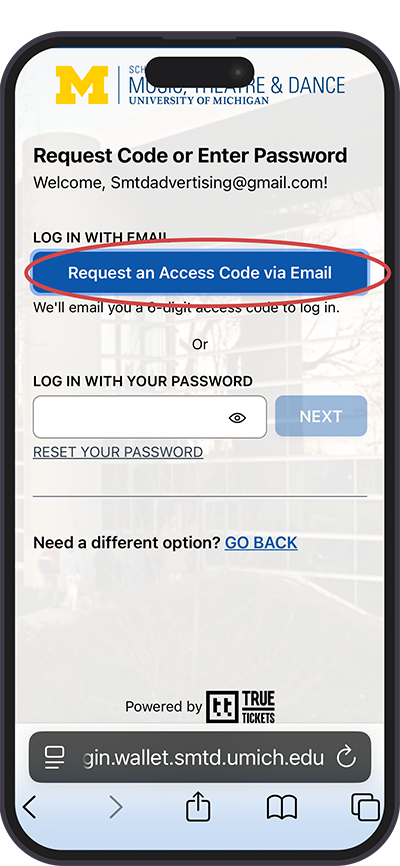
If you forgot your password or previously used Guest Checkout and don’t have a password, choose the “Log in Without a Password” option. You will receive an email with a 6-digit code you can copy and paste to access your account.
Need Additional Help?
Contact the Patron Services Office at 734-764-2538.
See current hours
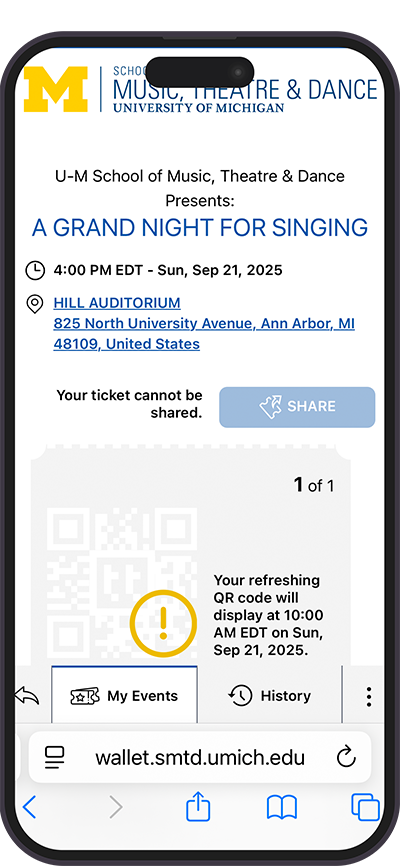
Once logged in, select your event. The QR code(s) for your ticket(s) will appear a few hours before the performance.
For iPhone
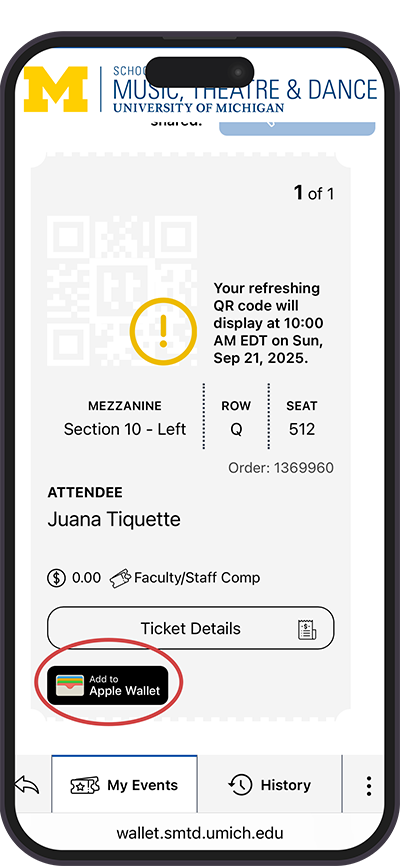
After following the instructions above to access your digital tickets, iPhone users can add their tickets to their Apple Wallet. This enables tickets to be saved in advance without logging in again on the day of the performance.
For Android
Please follow the instructions above to access your digital tickets on your web browser. Support for Google Wallet is coming soon.
Sharing Digital Tickets
We recommend that you share your digital tickets in advance if you won’t be arriving at the venue at the same time as others in your party. The recipient(s) will need to log in to access their ticket(s) and may need extra time.
How to Share Your Tickets
Log in to wallet.smtd.umich.edu using the steps above and select your event.
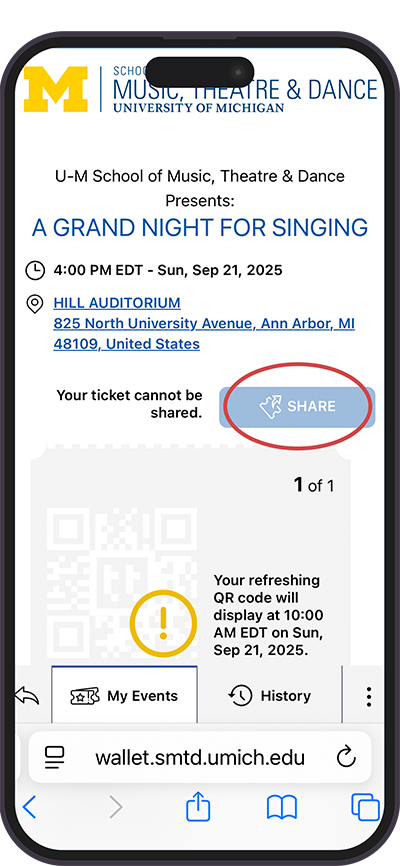
Tap the “Share” button, enter the recipient’s name, and select the tickets you want to share.
Read and agree to the Terms of Use, and tap “Next.”
Review and confirm the name and selected tickets, and tap “Confirm.”
Tap the “Share with your guest” icon and send the link to the recipient via text, email, or another app of your choice. Please note that certain pop-up blockers may interfere with this functionality. Alternatively, you can copy and paste the ticket link (by tapping the link icon) and send it manually to your guests.
Need to send the link again? Select “Share this invite again.”
How to Accept Shared Tickets
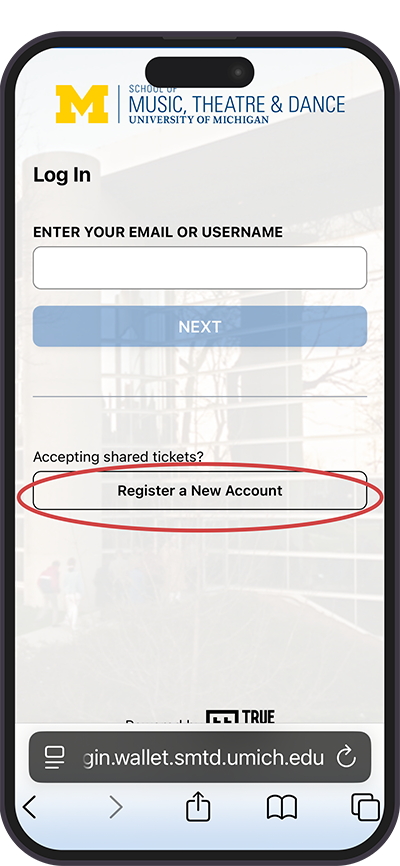
Recipients of shared tickets must be logged in to an account to accept shared tickets. If you are accepting shared tickets and have never set up an account with SMTD, select “Register New Account” on the login screen.
Troubleshooting
Known Issue with Gmail App (iPhone and Android)
If you attempt to access your tickets by clicking on a link from an SMTD email, you may not be able to properly use the ‘Request Access Code’ feature to log in without a password.
Recommendation: To get your tickets, open a new window in your smartphone’s web browser (Safari, Chrome, etc.) and go to wallet.smtd.umich.edu. If you forgot your password, you can then request an access code to be sent to your email.
Tickets Do Not Appear After Logging In
If you log in to wallet.smtd.umich.edu and your tickets do not appear, this may happen for a few different reasons.
Could your account be associated with a different email address? For example, a patron in our system might have both umich.edu and gmail.com email addresses.
In rare instances, tickets may be affiliated with the email address of another member of your household.
Digital tickets will also not appear if you selected a different ticket delivery method at the time of purchase (mail, hold at will call, etc.).
Recommendation: If the above conditions do not apply, please contact our Patron Services Team for assistance at 734-764-2538. You can also go directly to the venue box office upon arrival at your event.
Frequently Asked Questions
Can I use my order confirmation to attend?
Your order confirmation email is not a ticket. You will need to log in to wallet.smtd.umich.edu to access and retrieve your ticket(s).
Why can't I print my digital tickets?
The QR code on a digital ticket refreshes every 30 seconds as the event time approaches. This is for security purposes and to prevent unauthorized ticket resale. A printed ticket or screenshot of a ticket would be invalid in seconds.
Do I need a data plan to access digital tickets?
If you don’t have a data plan tied to your smartphone, you may not be able to connect to WiFi outside our venues to access digital tickets upon arrival. We don’t recommend using Digital Tickets if you don’t have a data plan.
Want to receive exclusive updates on SMTD’s 2025-26 Performance Season?
2025-26 Performance Season
Single ticket sales begin August 4 (10:00 am).